


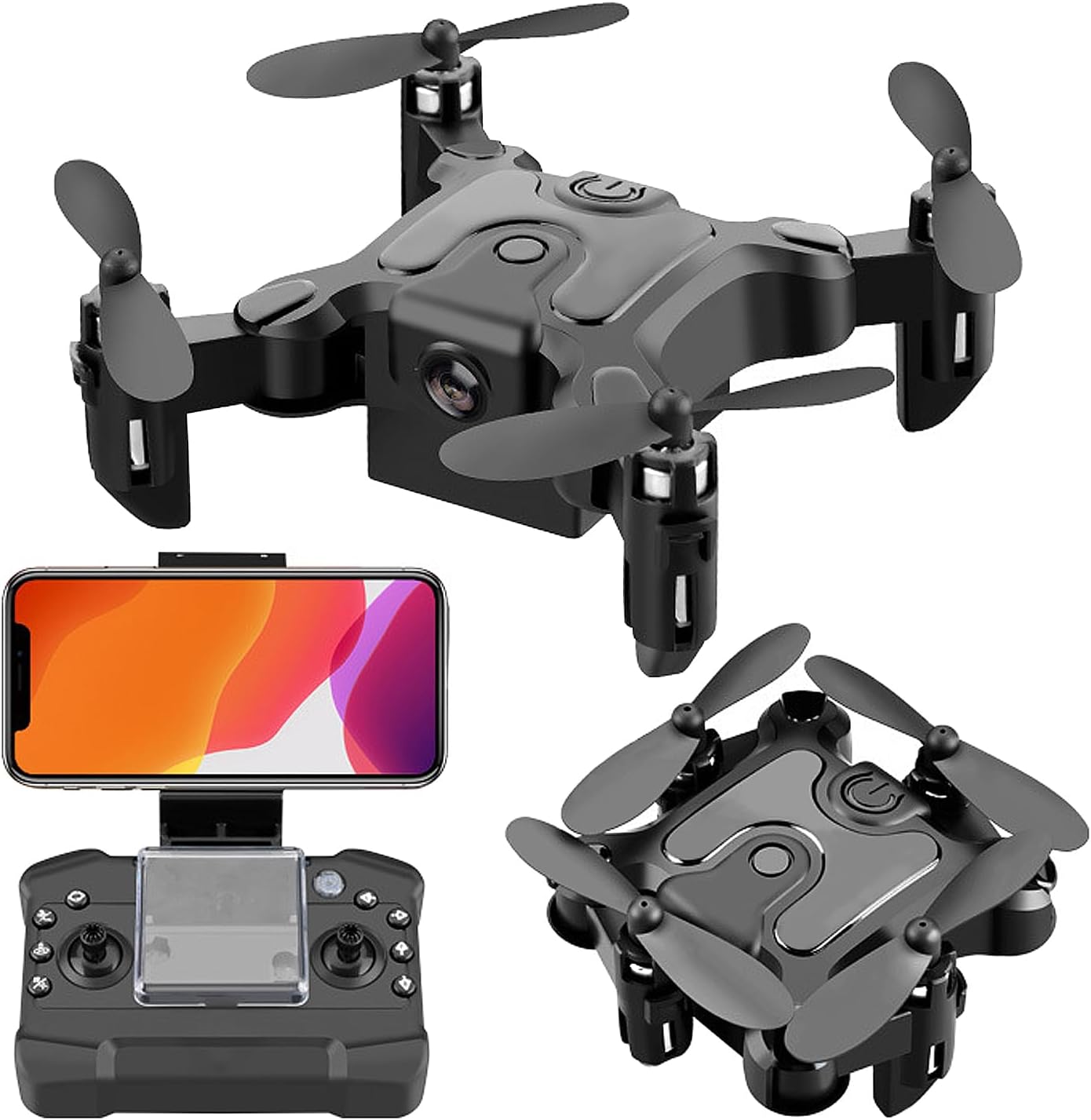


Mini Drone with 4K Camera Six-axis Stabilization Mini Shuttle Foldable FPV Drone Compact Covert UAV One Key Take Off/Land,Headless Mode,Support 360 Degree Flip

 4.0 (79 items)
 Limited Time Sale
$22.19 cheaper than the new price!!
Free cash-on-delivery fees for purchases over $99
Product details
| Management number | 208628108 | Release Date | 2026/03/22 | List Price | $14.80 | Model Number | 208628108 | ||
|---|---|---|---|---|---|---|---|---|---|
| Category | |||||||||
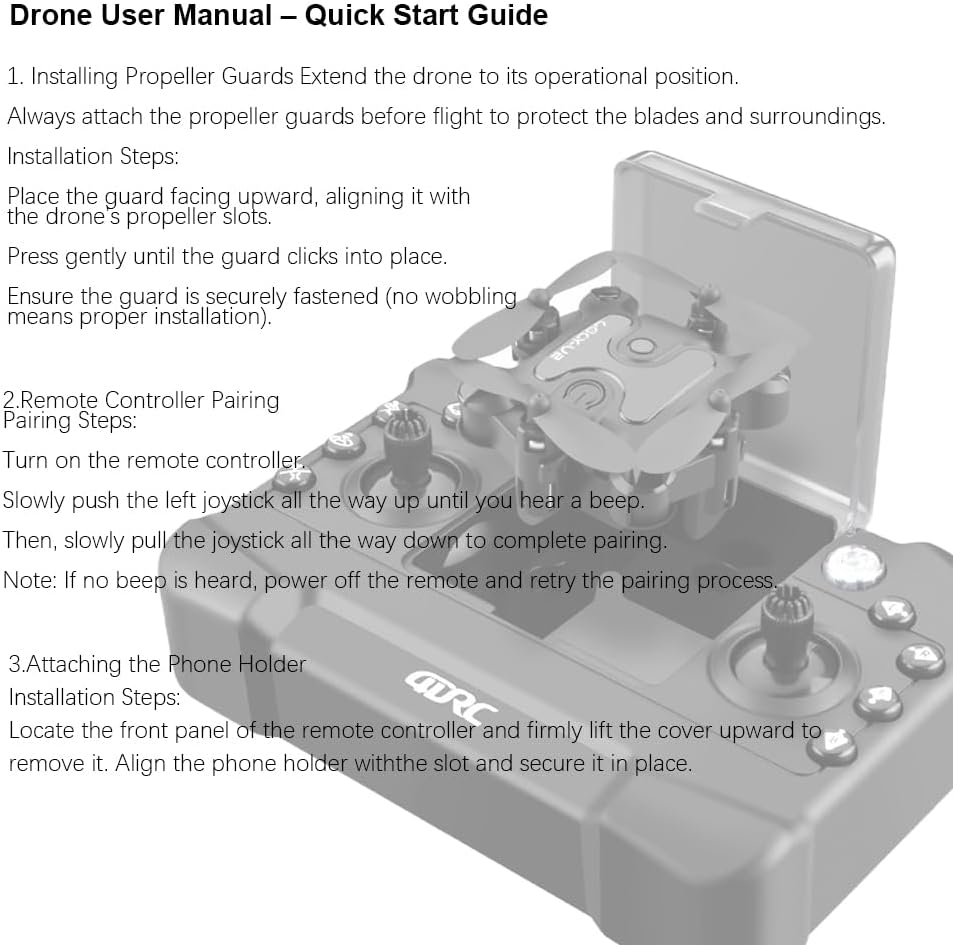
This mini drone with a 4K camera combines cutting-edge technology with a compact, foldable design, making it an ideal choice for both beginners and experienced drone enthusiasts. The 4K HD camera provides stunning aerial footage with high resolution, ensuring that every shot is crisp and clear.Equipped with a six-axis gyro stabilization system, it guarantees stable and smooth flight, even in slightly windy conditions. Its lightweight and foldable body make it incredibly portable, allowing you to easily take it anywhere for outdoor adventures or spontaneous photo shoots.With one-key takeoff and landing, the drone is easy to operate, minimizing the learning curve for new users. It also features headless mode, allowing you to control the drone without worrying about its orientation, while the 360° roll function enables exciting aerial flips and stunts. Whether you're capturing videos or just enjoying a fun flight, this drone offers an incredible flying experience with user-friendly features.Drone User Manual – Quick Start GuideTo ensure safe operation and optimal performance, please read the following instructions carefully before use.1. Installing Propeller GuardsExtend the drone to its operational position.Always attach the propeller guards before flight to protect the blades and surroundings.Installation Steps:Place the guard facing upward, aligning it with the drone’s propeller slots.Press gently until the guard clicks into place.Ensure the guard is securely fastened (no wobbling means proper installation).2. Remote Controller PairingPairing Steps:Turn on the remote controller.Slowly push the left joystick all the way up until you hear a beep.Then, slowly pull the joystick all the way down to complete pairing.Note: If no beep is heard, power off the remote and retry the pairing process.3. Attaching the Phone HolderInstallation Steps:Locate the front panel of the remote controller and firmly lift the cover upward to remove it.Align the phone holder with the slot and secure it in place.Tip: Ensure the holder is stable to prevent your phone from slipping during flight.Additional Safety NotesCharge both the drone and remote fully before first use.Fly in open areas, away from crowds, trees, and obstacles.
- 4K HD Camera: Equipped with a high-quality 4K camera, this mini drone delivers clear and detailed photos and videos, providing an exceptional aerial photography experience with crisp resolution.
- Six-Axis Stabilization System: The advanced six-axis gyro stabilization system ensures smooth flight performance, providing stable images and reliable handling whether flying indoors or outdoors.
- Foldable Design for Portability: Featuring a compact and foldable design, this drone is lightweight and easy to carry, perfect for travel and outdoor activities. You can easily store it in a bag and capture beautiful moments anywhere.
- One-Key Takeoff/Landing for Easy Operation: The drone supports one-key takeoff and landing, simplifying control for beginners and ensuring safe flight, making it accessible to users of all skill levels.
- 360° Flip and Headless Mode: With 360° flip functionality and headless mode, you can perform aerial stunts and control the drone effortlessly from any direction, adding more fun and versatility to your flight experience.
| UPC | 758918531399 |
|---|---|
| Brand | CT-dct |
| Color | Black |
| Batteries | 1 9V batteries required. |
| Item Weight | 8 ounces |
| Control Type | Remote Control |
| Manufacturer | CT-dct |
| Special Feature | 4K HD Camera, Six-axis Stabilization, Foldable Design, One-key Takeoff/Landing, Headless Mode, 360-degree Flip |
| Battery Capacity | 700 Amp Hours |
| Special Features | 4K HD Camera, Six-axis Stabilization, Foldable Design, One-key Takeoff/Landing, Headless Mode, 360-degree Flip |
| Product Dimensions | 3.5"L x 3.5"W x 1.5"H |
| Included Components | Camera, Phone Holder, Propeller, Propeller Guard, Remote Control, USB Charger, User Manual |
| Age Range Description | Kid |
| Are Batteries Included | No |
| Connectivity Technology | USB |
| Remote Control Included | Yes |
| Battery Cell Composition | Lithium Ion |
| Manufacturer Part Number | URV1 |
| Video Capture Resolution | 4K |
| Rechargeable Battery Included | No |
1/100


Quadcopters & Multirotors



Correction of product information
If you notice any omissions or errors in the product information on this page, please use the correction request form below.
Correction Request Form